

Blended learning works best when online learning and instructor-led training are part of the same journey rather than separate experiences.
Yet many organisations still manage digital courses, classroom training, attendance, and assessments through disconnected systems. Learners arrive at workshops without completing their pre-work, training managers spend hours coordinating sessions, and administrators struggle to maintain accurate learning records.
Totara addresses these challenges by bringing self-paced courses, instructor-led seminars, assessments, completion tracking, certifications, collaboration, and reporting into one learning platform.
With the right configuration, organisations can require learners to complete online training before accessing a classroom or virtual session, track attendance, assess practical skills, and maintain a centralised record of the entire learning journey.
This guide explains how to implement blended learning in Totara, which features to use, and how to design a learning experience that supports both learner development and organisational training objectives.
What Is Blended Learning in Totara?
Blended learning in Totara combines self-paced digital learning with instructor-led training, practical assessments, and collaborative learning experiences within a structured learning pathway.
The digital portion allows learners to acquire foundational knowledge independently, while instructor-led sessions focus on discussion, practice, coaching, and real-world application.
A typical Totara blended learning pathway might look like this:
Online module → Knowledge quiz → Instructor-led seminar → Practical assessment → Course completion
For example, an organisation delivering workplace safety training could require employees to complete an online safety module before attending an instructor-led equipment demonstration. Employees could then complete a practical assessment to demonstrate their understanding.
Totara’s Pathway course format is particularly useful for this approach because it presents individual activities as stages within a structured learning journey.
Unlike managing online courses and classroom sessions independently, a connected pathway gives learners clear direction and allows training managers to monitor progress throughout the programme.
If you are new to the platform, our guide on what Totara LMS is provides an overview of its enterprise learning capabilities.
Benefits of Using Totara for Blended Learning
For organisations managing multiple training formats, Totara provides a common environment for learning delivery, administration, and reporting.
1. Centralised Training Management
Training administrators can manage digital courses, seminar registrations, attendance, assessments, and completion records within the same platform.
This reduces the need to maintain separate spreadsheets and systems for different training activities.
2. Better Use of Instructor Time
By delivering foundational knowledge through self-paced content, organisations can reserve instructor-led sessions for activities that benefit from human interaction.
Trainers can spend more time on practical exercises, individual feedback, coaching, and problem-solving.
3. Consistent Training Across Distributed Teams
Organisations operating across multiple locations can deliver standardised online learning while scheduling instructor-led sessions according to local workforce requirements.
This is particularly useful for enterprises with regional offices, frontline employees, or remote teams.
4. Reduced Administrative Workload
Audience-based learning assignments, completion rules, seminar notifications, and certification workflows can reduce repetitive administrative tasks.
Training managers can focus more on programme quality and learner outcomes instead of manually coordinating every stage of training.
5. Improved Visibility Into Learning Progress
Totara allows organisations to monitor digital learning, seminar participation, assessment results, and overall completion.
This helps training managers identify learners who require additional support and stages of the learning journey that need improvement.
6. Support for Recurring and Compliance Training
Organisations can use certifications to manage training that must be repeated at defined intervals.
This is valuable for industries where employees need to maintain qualifications, demonstrate competency, or regularly renew mandatory training.
Key Totara Features That Support Blended Learning
Before configuring a blended learning programme, it helps to understand how Totara’s capabilities work together.
| Totara feature | Role in blended learning |
|---|---|
| Pathway course format | Presents activities in a structured learning journey |
| SCORM and digital learning activities | Deliver self-paced learning content |
| Seminar management | Coordinates classroom and virtual instructor-led training |
| Activity completion | Tracks individual learning milestones |
| Access restrictions | Controls progression between activities |
| Dynamic audiences | Automates learning assignments based on learner attributes |
| Programs | Organises multiple courses into structured learning pathways |
| Certifications | Manages recurring training and renewal requirements |
| Workspaces and discussions | Supports collaboration and peer learning |
| Centralised notifications | Sends configured training reminders and updates |
| Report Builder | Provides visibility into participation, progress, and completion |
Feature availability and configuration options may vary depending on your Totara version, enabled functionality, and platform setup.
How to Build a Blended Learning Program in Totara
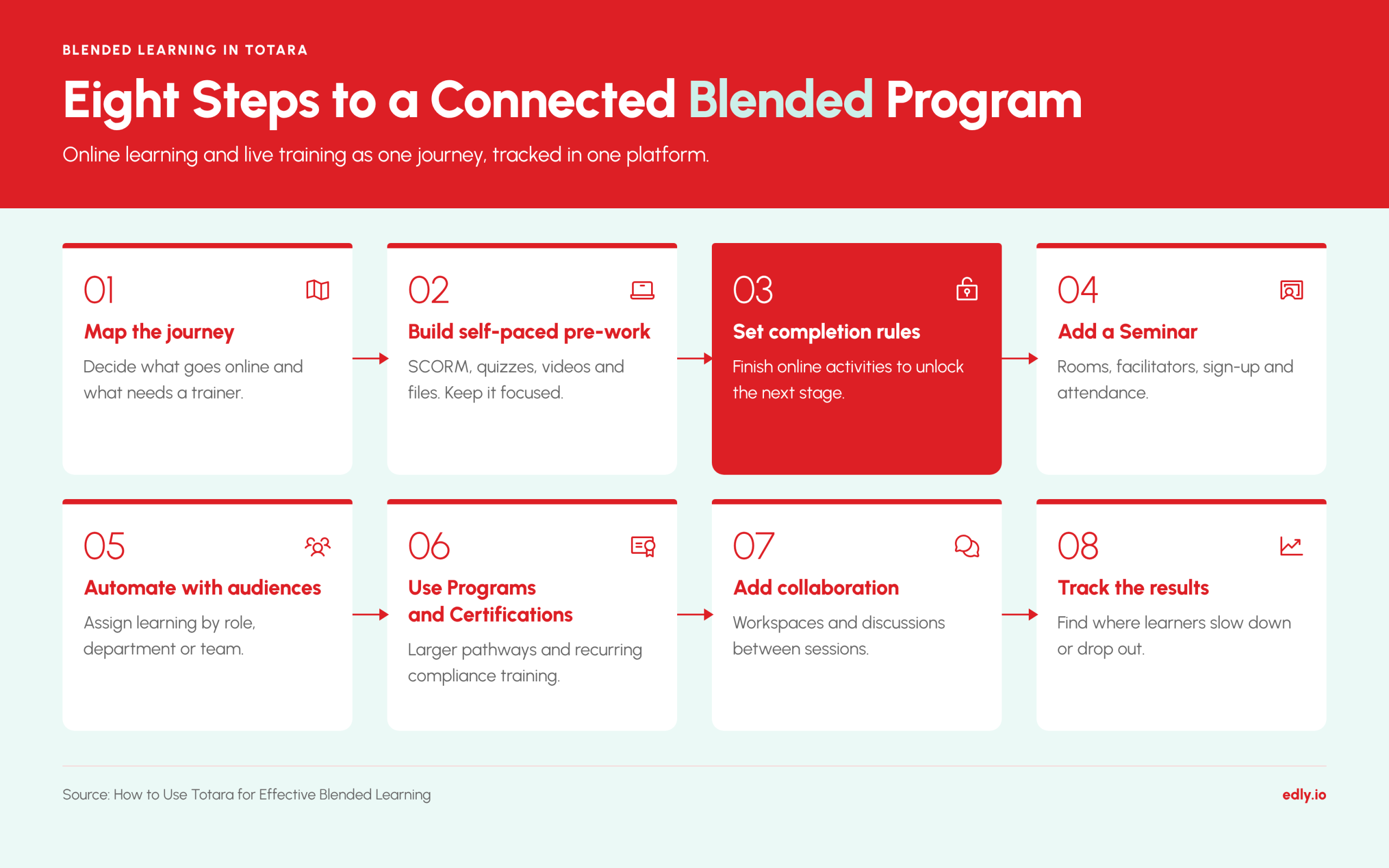
1. Map the Learning Journey First
Before building anything in Totara, decide what learners should complete independently and what genuinely requires an instructor.
Start by defining the knowledge, skills, or behaviours learners should demonstrate after completing the programme.
Foundational knowledge usually works well through:
- Short instructional videos
- SCORM modules
- Reading materials and downloadable resources
- Knowledge quizzes
- Interactive scenarios
Reserve instructor-led sessions for practical exercises, role-play, demonstrations, coaching, discussions, and collaborative problem-solving.
For example, employees learning customer service procedures can review policies and complete knowledge checks online. During the instructor-led session, they can practise handling difficult customer interactions and receive feedback from a trainer.
Mapping the journey before configuring the platform prevents expensive instructor-led sessions from becoming presentations that could have been delivered online.
2. Build the Self-Paced Learning Content
Create a course in Totara and add the digital activities learners need to complete before attending live training.
Depending on your learning requirements, a Totara course can include SCORM packages, quizzes, assignments, videos, files, external resources, and discussion activities.
Where appropriate, use the Pathway course format to present these activities in a structured sequence.
A pre-training course could contain:
| Activity | Learning objective |
|---|---|
| Introductory video | Introduce the training objectives |
| Interactive e-learning module | Develop foundational knowledge |
| Downloadable resource | Provide reference material |
| Knowledge quiz | Assess readiness for live training |
| Seminar activity | Provide access to instructor-led training |
Keep the pre-work focused. Learners should arrive at the live session with enough knowledge to participate, without spending unnecessary hours reviewing material that does not contribute to the learning objective.
3. Use Completion Rules to Connect Online and Live Learning
Activity completion and access restrictions are essential for creating a structured blended learning experience in Totara.
Without these rules, learners may register for instructor-led sessions before completing the required preparation.
Configure activity completion criteria for each relevant digital activity. These criteria can depend on the activity type and may include viewing content, receiving a grade, or achieving a passing score.
Next, configure access restrictions on the Seminar activity so learners can access it only after meeting the defined prerequisites.
For example:
Complete e-learning module → Pass knowledge quiz → Access seminar registration
An illustrative configuration could require learners to complete a digital module and achieve a minimum quiz score of 80% before accessing the seminar.
The passing threshold should reflect your organisation’s training objectives rather than an arbitrary percentage.
This creates a flipped-learning model where learners arrive prepared and trainers can focus on applying knowledge instead of repeating foundational material.
Before launching the course, test the pathway using a learner account to confirm that completion rules and access restrictions behave as intended.
4. Add and Configure a Totara Seminar
The Seminar activity manages the instructor-led component of a blended learning programme.
It allows training administrators to organise physical classroom training, virtual sessions, and events that take place across multiple sessions.
To configure a seminar:
- Open the relevant Totara course and enable editing.
- Add a Seminar activity.
- Configure the activity’s registration, attendance, and completion settings.
- Create seminar events with the required dates and sessions.
- Assign rooms, facilitators, and training resources where applicable.
- Configure notifications and reminders.
- Record attendance following the training.
For virtual instructor-led training, organisations can configure virtual-room providers such as Microsoft Teams or Zoom, subject to the relevant integrations and platform requirements.
Consider offering multiple seminar dates when training employees across different locations, departments, or working schedules.
After the session, attendance can contribute to activity completion based on the configured rules. This gives administrators visibility into learners who attended, missed training, or still need to complete the instructor-led component.
For detailed configuration instructions, refer to Totara’s official seminar setup documentation.
5. Automate Enrolment With Dynamic Audiences
For larger organisations, manually assigning learning to every employee quickly becomes impractical. This becomes particularly challenging when new employees join, existing employees change roles, or training requirements differ across departments.
Totara’s dynamic audiences allow administrators to group learners automatically based on defined criteria, such as job position, organisational unit, or profile information.
These audiences can then be assigned relevant courses, programs, and certifications.
For example:
| Dynamic audience | Assigned blended learning pathway |
|---|---|
| New employees | Company orientation and instructor-led onboarding |
| Sales representatives | Product training and live sales coaching |
| First-time managers | Leadership modules and management workshops |
| Healthcare staff | Mandatory training and practical competency assessments |
| Warehouse employees | Safety training and equipment demonstrations |
To configure this, create a dynamic audience, define its membership rules, and assign the relevant learning through audience-based enrolment.
Where employee information is maintained in an external HR system, integrating that system with Totara can help keep audience membership and learning assignments up to date.
This reduces manual enrolment and helps employees receive training relevant to their responsibilities.
6. Use Programs and Certifications for Larger Learning Pathways
A single course may be sufficient for a short blended learning initiative. However, more extensive training programmes often involve multiple courses, practical sessions, and assessments.
Totara provides two useful features for managing these requirements: Programs and Certifications.
Programs allow organisations to organise multiple courses into a structured learning pathway. Administrators can define progression requirements so learners complete training in the intended sequence.
Certifications support learning that must be repeated within a defined period, such as mandatory compliance training, workplace safety, or professional development requirements.
For example, an annual workplace safety certification could include:
Online safety training → Knowledge assessment → Instructor-led demonstration → Practical assessment → Certification
When renewal is required, learners can be assigned the appropriate recertification pathway.
This approach helps organisations manage recurring training requirements and maintain evidence of completed learning without manually rebuilding the programme every year.
7. Incorporate Collaborative and Social Learning
Learning does not always end when a workshop finishes or a course is marked complete.
Employees may need ongoing access to colleagues, subject matter experts, and learning resources as they apply new knowledge in the workplace.
Totara’s collaborative learning capabilities, including workspaces, discussions, resources, and playlists, can support this part of the blended learning experience.
For example, a leadership development programme could use a dedicated workspace where participants:
- Submit questions before instructor-led workshops.
- Share experiences and practical challenges.
- Exchange useful learning resources.
- Discuss how they are applying newly acquired skills.
- Receive guidance from facilitators and colleagues.
Collaboration is particularly valuable for distributed teams that have limited opportunities for face-to-face knowledge sharing.
However, use collaborative features selectively. Every additional activity should contribute to a defined learning objective rather than create another channel employees are expected to monitor.
8. Configure Course Completion and Reporting
Once the learning activities are connected, define what constitutes successful completion of the entire course.
For example, learners may need to:
- Complete all mandatory digital learning activities.
- Achieve a passing score on the knowledge assessment.
- Attend the required instructor-led seminar.
- Successfully complete a practical assignment.
Configure the course completion conditions to reflect these requirements.
Totara’s Report Builder can then help administrators monitor online learning progress, assessment results, seminar participation, course completion, and certification status.
Look for stages where learners consistently slow down or drop out.
If employees complete the digital module but frequently miss the seminar, scheduling or communication may need attention. If they attend the seminar but struggle with the practical assessment, the learning design or instructional approach may need improvement.
Use this information to refine the programme over time.
Common Blended Learning Challenges and How Totara Addresses Them
Implementing blended learning across an organisation introduces operational and instructional challenges. Understanding these challenges early can help L&D teams configure Totara more effectively.
| Challenge | How Totara can help |
|---|---|
| Learners arrive unprepared for instructor-led training | Activity completion and access restrictions can enforce prerequisites. |
| Employees frequently miss live training sessions | Seminar notifications, reminders, and flexible event scheduling can improve coordination. |
| Administrators spend too much time assigning training | Dynamic audiences can automate learning assignments. |
| Training records are spread across multiple systems | Course, seminar, and assessment records can be maintained within Totara. |
| Different departments require different training | Audience-based assignments and tailored learning pathways support role-specific training. |
| Mandatory training expires without timely renewal | Certifications and recertification workflows support recurring training requirements. |
| Training managers lack visibility into learner progress | Configurable reports provide insight into participation and completion. |
| Frontline employees have limited connectivity | Totara Mobile supports offline access to compatible learning content when configured appropriately. |
While Totara provides functionality to address these challenges, successful implementation depends on accurate learner data, appropriate configuration, and a learning design that reflects workforce needs.
Best Practices for Effective Blended Learning in Totara
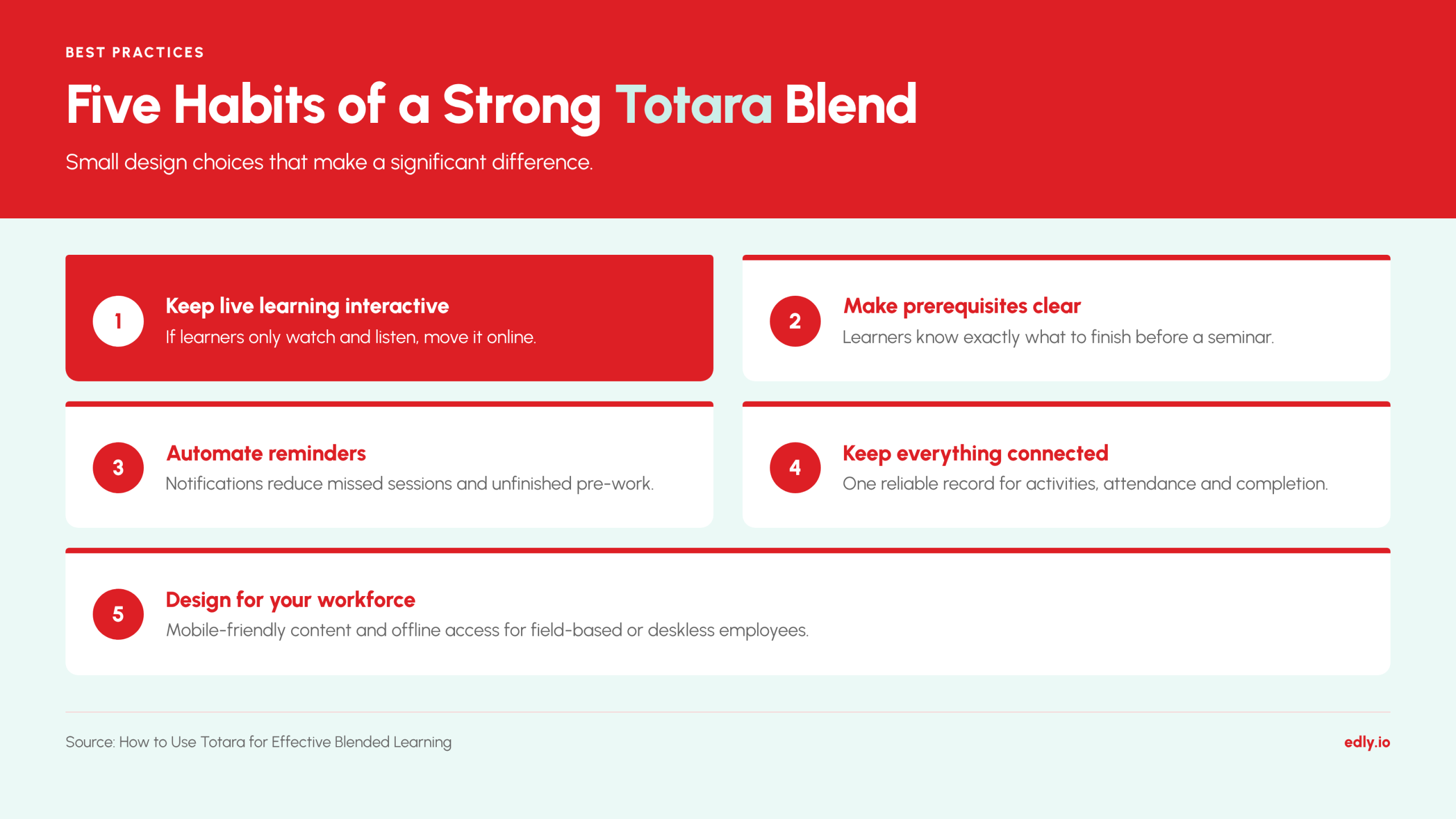
Keep Instructor-Led Training Interactive
If learners only need to watch, listen, or read, consider whether that content would work better as self-paced learning.
Reserve instructor-led sessions for activities that require discussion, practical application, demonstrations, and personalised feedback.
Make Learning Prerequisites Clear
Learners should understand what they need to complete before attending a seminar, why those activities matter, and how much time they should allocate to preparation.
Communicate these requirements through course instructions and relevant notifications.
Automate Notifications Without Overwhelming Learners
Use Totara’s notification capabilities to remind learners about upcoming training, incomplete activities, seminar registrations, and certification deadlines where supported.
Avoid unnecessary reminders that can cause employees to disengage from important communications.
Design for Different Workforce Needs
Not every employee has access to a desktop computer or a reliable internet connection throughout the working day.
For frontline, field-based, or deskless employees, consider shorter learning modules, mobile-friendly content, flexible seminar schedules, and offline learning where supported.
Test the Entire Learning Journey Before Launch
A course may function correctly for administrators while creating unexpected barriers for learners.
Before rolling out the programme, test the experience using representative learner accounts. Check activity restrictions, enrolment, seminar registration, notifications, mobile compatibility, attendance recording, and course completion.
Also test exceptions, such as learners who fail an assessment, miss a seminar, or need to reschedule their training.
Measure Learning Outcomes, Not Just Participation
Course completion and attendance are useful indicators, but they do not necessarily demonstrate that employees have acquired the required skills.
Include practical assessments, knowledge checks, and post-training evaluation to determine whether the learning objectives have been achieved.
Blended Learning in Totara: Practical Use Cases Across Industries
Blended learning can support different training requirements, from employee onboarding to industry-specific professional development.
The following examples illustrate how organisations can structure these experiences using Totara.
Employee Onboarding
New employees often need to absorb large amounts of information while becoming familiar with their teams, responsibilities, and workplace processes.
A blended onboarding pathway could include:
Digital orientation → Company policies → Instructor-led onboarding session → Role-specific training → Manager assessment
Totara’s audience-based assignments can help organisations automatically provide relevant onboarding training to new employees based on their roles or departments.
Healthcare and Clinical Training
Healthcare organisations often need to combine theoretical knowledge with supervised practical training.
A blended learning pathway could include:
Online clinical education → Knowledge assessment → Supervised practical workshop → Competency assessment → Certification
Totara can help training teams coordinate learning activities and maintain training records. Practical competency validation should still follow the organisation’s clinical and regulatory requirements.
Compliance and Regulatory Training
Compliance training often requires employees to understand policies, apply them in realistic situations, and complete training at recurring intervals.
A blended pathway could include:
Online policy training → Scenario-based quiz → Instructor-led discussion → Final assessment → Recertification
Totara’s certifications and reporting capabilities can support training administrators in monitoring completion and renewal requirements.
Leadership and Management Development
Leadership development benefits from a combination of theoretical learning, practical coaching, and peer interaction.
A blended leadership programme could include:
Self-paced leadership modules → Knowledge quiz → Management workshop → Practical assignment → Peer discussion
Managers can acquire foundational knowledge independently and then practise decision-making, communication, and feedback techniques during instructor-led sessions.
Manufacturing and Workplace Safety
Employees working with machinery or industrial equipment may need both theoretical knowledge and supervised practical instruction.
A blended safety training pathway could include:
Digital safety training → Knowledge assessment → Equipment demonstration → Supervised practice → Practical competency assessment
This allows organisations to deliver consistent foundational training while reserving instructor time for practical instruction and assessment.
Sales and Customer Service Training
Sales and customer service teams need product knowledge as well as the ability to communicate effectively in real-world situations.
A blended pathway could include:
Product training → Knowledge quiz → Live role-play session → Coaching → Performance evaluation
Self-paced learning helps employees become familiar with products and procedures, while instructor-led sessions provide opportunities to practise customer interactions.
How to Measure the Effectiveness of Blended Learning in Totara
An effective blended learning programme should demonstrate progress beyond course completion.
L&D teams should evaluate whether learners are acquiring knowledge, developing skills, and applying what they have learned in the workplace.
Consider tracking the following metrics:
| Metric | What it measures | Potential data source |
|---|---|---|
| Online activity completion rate | Participation in self-paced learning | Totara completion reports |
| Seminar attendance rate | Participation in instructor-led training | Totara seminar reports |
| Seminar no-show rate | Scheduling and attendance challenges | Totara attendance records |
| Pre- and post-training assessment scores | Improvement in learner knowledge | Quiz and assessment results |
| Practical assessment pass rate | Ability to demonstrate required skills | Assignments and recorded assessment grades |
| Certification completion rate | Completion of mandatory training requirements | Totara certification reports |
| Learner satisfaction | Perceived relevance and quality of training | Feedback activities or surveys |
| Knowledge retention | Understanding after a defined period | Follow-up assessments |
| Time to competency | Time required to demonstrate role-specific skills | Manager evaluations and operational data |
| Training cost per employee | Financial efficiency of training delivery | LMS, HR, and financial data |
| Workplace application | Transfer of learning into everyday responsibilities | Manager feedback and performance data |
Totara can provide much of the learning participation, attendance, assessment, and completion data. However, measuring business outcomes such as productivity, training costs, or time to competency may require additional reporting, integrations, or data collection.
For example, if an organisation introduces a blended onboarding programme, it can compare how quickly employees demonstrate required competencies before and after implementation.
Similarly, a compliance team can monitor certification completion alongside relevant operational indicators.
The objective is to understand whether the blended learning programme is improving workforce capability and where further investment in training is needed.
When Does Your Totara Blended Learning Programme Need Customisation?
Totara’s standard functionality can support many blended learning requirements. However, complex organisational structures, existing technology systems, and industry-specific workflows may introduce requirements that extend beyond standard configuration.
Customisation or integration may be worth considering when your organisation needs to:
- Automatically synchronise employee information with an HRIS or ERP system.
- Connect external virtual classroom or content delivery platforms.
- Build specialised dashboards for training managers and department heads.
- Implement approval workflows for instructor-led training.
- Manage learning across multiple business units or tenants.
- Integrate learning records with external competency or performance management systems.
- Create specialised learner experiences for different workforce groups.
Before investing in custom development, evaluate whether your requirements can be addressed through Totara’s existing functionality.
A configuration-first approach can help reduce implementation complexity and ongoing maintenance costs. Custom development should address genuine operational or learning requirements that standard features cannot adequately support.
How Edly Can Help You Implement Blended Learning in Totara
Every organisation has different training requirements, workforce structures, and existing technology systems. A blended learning programme designed for a healthcare organisation may require a very different configuration from one designed for a distributed sales workforce.
As a Totara Solutions Partner, Edly helps organisations implement and customise Totara around their specific learning and operational requirements.
Our Totara services include:
- Totara implementation and configuration: Setting up courses, seminars, learning pathways, audiences, and completion workflows.
- Custom Totara development: Extending platform functionality to address organisation-specific learning requirements.
- Third-party integrations: Connecting Totara with HR systems, virtual classrooms, enterprise applications, and other learning tools.
- Instructional design and course development: Designing digital learning experiences that complement instructor-led training.
- Custom reporting and learner analytics: Building reports and dashboards aligned with organisational training objectives.
- Managed hosting and ongoing support: Supporting the operation, maintenance, and continued development of your Totara platform.
Whether you are introducing blended learning to an existing Totara platform or implementing a new enterprise learning solution, Edly can help you build a learning environment that supports your workforce and training objectives.
Explore our custom Totara LMS solutions to learn how we can help.
Looking to implement blended learning in Totara? Talk to our Totara experts to discuss your requirements.
Final Thoughts
Effective blended learning begins with a clear understanding of what learners need to know, what they need to practise, and how they will demonstrate their skills.
Totara provides the functionality to connect these stages through self-paced learning, instructor-led seminars, completion rules, automated learning assignments, certifications, and reporting.
For L&D teams, the opportunity is to reduce fragmented training processes while creating learning experiences that are relevant to employees and measurable against organisational objectives.
Start with a clearly defined learning journey. Configure Totara around that journey, evaluate the results, and refine the programme as your workforce needs evolve.
The quality of blended learning ultimately depends on how effectively each learning format contributes to the intended outcome.
Frequently Asked Questions
Can Totara be used for blended learning?
Yes. Totara supports blended learning through self-paced digital courses, instructor-led seminars, assessments, activity completion rules, programs, certifications, collaborative learning features, and reporting. Organisations can combine these capabilities to create structured learning experiences.
How do you create a blended learning course in Totara?
Create a Totara course and add self-paced learning activities, assessments, and a Seminar activity. Configure completion criteria and access restrictions to control learner progression. Set up seminar events, notifications, attendance tracking, and overall course completion requirements.
Can Totara seminars be delivered virtually?
Yes. Totara Seminar activities can support physical and virtual instructor-led training. Virtual-room providers such as Microsoft Teams and Zoom can be configured, depending on the platform setup and relevant integration requirements.
Can learners be required to complete online training before attending a seminar?
Yes. Totara supports activity completion conditions and access restrictions that allow administrators to require learners to complete specified online activities or achieve defined assessment results before accessing a Seminar activity.
What is the difference between a course, seminar, and program in Totara?
A course contains learning activities and resources. A Seminar is an activity within a course that manages instructor-led training. A Program organises multiple courses into a structured learning pathway with defined completion requirements.
Can Totara automate blended learning assignments?
Yes. Totara’s dynamic audiences allow organisations to group learners based on defined criteria and assign relevant courses, programs, or certifications. This helps automate training assignments for new employees, specific job roles, or organisational units.
Is Totara suitable for blended compliance training?
Yes. Totara can combine digital policy training, instructor-led sessions, assessments, attendance tracking, and certifications. Recertification functionality can help organisations manage recurring training requirements and maintain completion records.
Can employees access blended learning content on mobile devices?
Yes. Totara Mobile allows employees to access compatible learning activities on mobile devices. Supported content can also be made available offline, depending on the Totara version, content type, and platform configuration.
How do you measure blended learning effectiveness in Totara?
Organisations can use Totara reports to monitor activity completion, seminar attendance, assessment performance, and certification progress. Additional measures, such as knowledge retention, workplace application, and time to competency, can provide a more comprehensive understanding of learning effectiveness.
Does blended learning in Totara require custom development?
Not necessarily. Many blended learning requirements can be addressed using Totara’s existing functionality. Custom development may be necessary for specialised workflows, third-party integrations, advanced reporting, or organisation-specific learner experiences.
