

LMS architecture is the structural design of a learning management system: the layers, services, data stores and integrations that deliver courses, track learners and connect to the rest of an institution’s systems. A good architecture decides how well an LMS scales, how secure it is, how easily it plugs into other tools and how much it costs to run.
TL;DR for decision-makers
- Five layers: most LMS platforms combine a presentation layer, an application and services layer, a data layer, an integration layer and an infrastructure layer.
- Pattern choice matters less than fit: a well-built modular monolith often beats poorly run microservices for small teams; microservices pay off at scale and with many teams.
- Standards are the integration contract: SSO (SAML, OIDC), LTI 1.3, SCORM, xAPI, OneRoster and SCIM are what make an LMS interoperable rather than a silo.
- Deployment is a business decision: SaaS, single-tenant, private cloud and on-premises differ in cost, control, data residency and exit options.
- Evaluate on evidence: ask vendors for architecture diagrams, standards certifications, security reports and a documented data-export path before you sign.
- Free resource: Download the free LMS Architecture Evaluation Checklist (Google Sheets) to score vendors on layers, standards, security, deployment and exit path.
What is LMS architecture and why does it matter?
LMS architecture describes how the parts of a learning management system are organised and how they talk to each other: the user interface, the services that run courses and assessments, the databases that hold learner records, the connections to identity and student systems, and the infrastructure underneath.
It matters because the same features can sit on very different foundations, and the foundation determines outcomes that leaders feel directly:
- Scale and reliability: whether the platform stays fast during enrollment peaks and exam windows.
- Security and privacy: how learner data is isolated, encrypted, audited and kept in the right region.
- Interoperability: whether it connects cleanly to your identity provider, student information system, HR system and learning tools.
- Total cost and flexibility: how expensive it is to customise, upgrade, host and eventually migrate away from.
For education leaders, architecture is the difference between a platform that adapts as programmes grow and one that has to be replaced. For technical buyers, it is the basis for judging vendor claims.
The core layers and components of an LMS
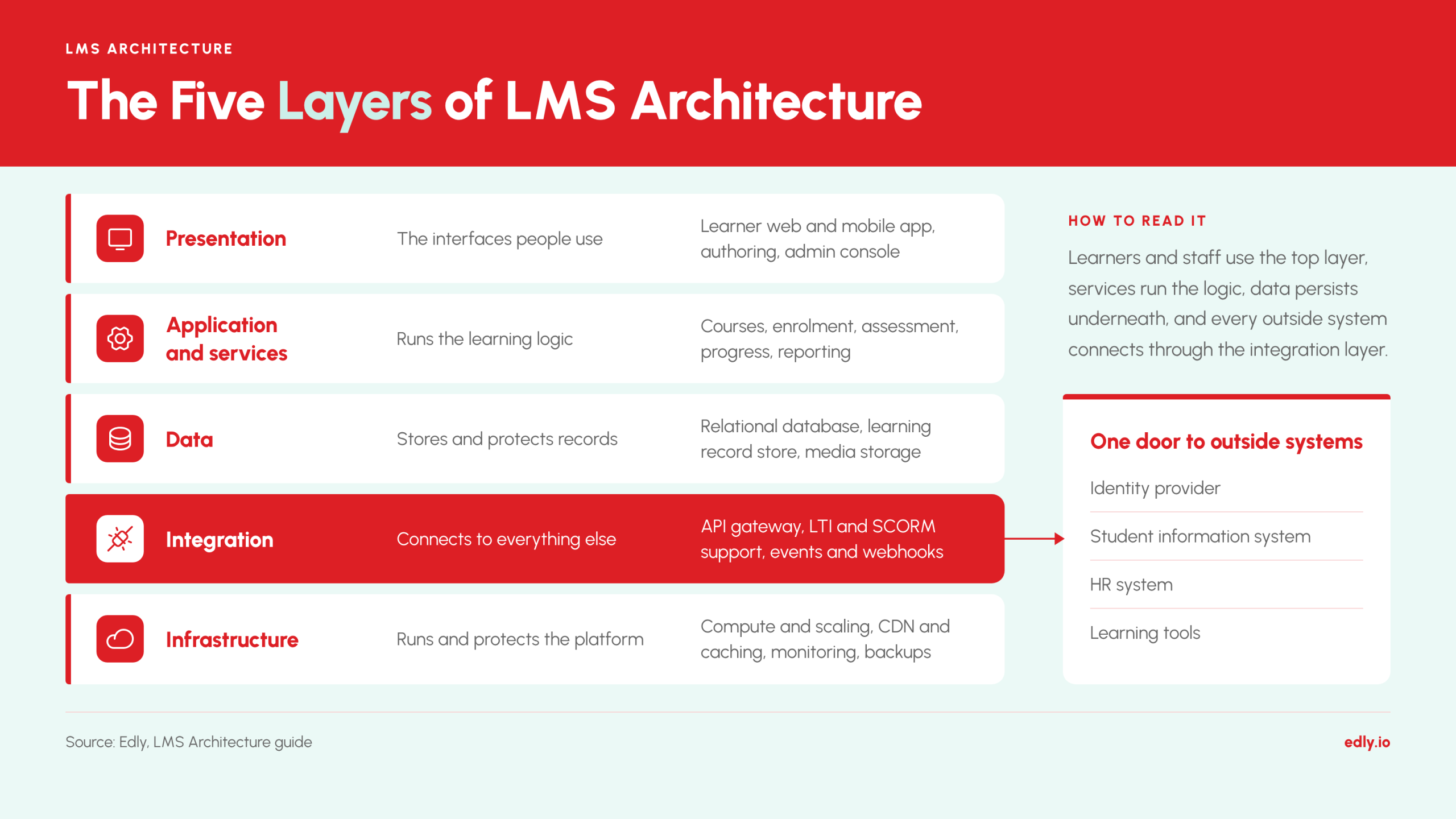
Most LMS platforms, whether proprietary or open source, can be described as five layers. The diagram shows how they stack and where the platform meets the outside world.
Learners and staff use the presentation layer, services in the layer below run the learning logic, data persists underneath, and the integration layer, highlighted, is the single door through which identity, student, HR and tool systems connect.
| Layer | What it does | Typical components |
|---|---|---|
| Presentation | The interfaces people use | Learner web and mobile app, authoring tools, admin console |
| Application and services | Runs the learning logic | Course and content, users and enrolment, assessment, progress tracking, reporting, notifications |
| Data | Stores and protects records | Relational database, learning record store for xAPI, media and file storage |
| Integration | Connects to everything else | API gateway, LTI and SCORM support, events and webhooks |
| Infrastructure | Runs and protects the platform | Compute and scaling, CDN and caching, monitoring and backups |
Architecture patterns: monolith, modular monolith, microservices or headless?
There is no universally best pattern; the right one depends on team size, scale and how often parts of the platform change independently. The table compares the four patterns you will meet when evaluating or building an LMS.
| Pattern | How it works | Strengths | Trade-offs | Best fit |
|---|---|---|---|---|
| Monolith | One deployable application holds all features | Simple to build, test and run | Hard to scale parts separately; large upgrades carry more risk | Small institutions, pilots, tight budgets |
| Modular monolith | One deployable application with strict internal module boundaries | Keeps simplicity while preparing for later splitting | Needs discipline to keep boundaries clean | Growing teams that want order without operational overhead |
| Microservices | Features run as separate services communicating over APIs or events | Independent scaling and releases; fault isolation | More operational complexity, monitoring and network failure modes | Large platforms with many teams and uneven load |
| Headless / API-first | Back end exposes APIs; any front end can sit on top | Custom learner experiences, embedding learning in other products | Front-end work shifts to you | Organisations embedding learning in their own apps or portals |
How to choose
- Start with team size. A small team usually moves faster on a modular monolith than on a dozen services.
- Look at load patterns. If assessments or video spike far above everything else, separating those parts pays off.
- Check release independence. If different teams must ship without coordinating, service boundaries help.
- Count your integrations. Heavy integration needs favour a clear API layer regardless of pattern.
- Weigh the operating cost. Microservices shift complexity from code to operations; make sure you can staff it.
How data flows through an LMS, step by step
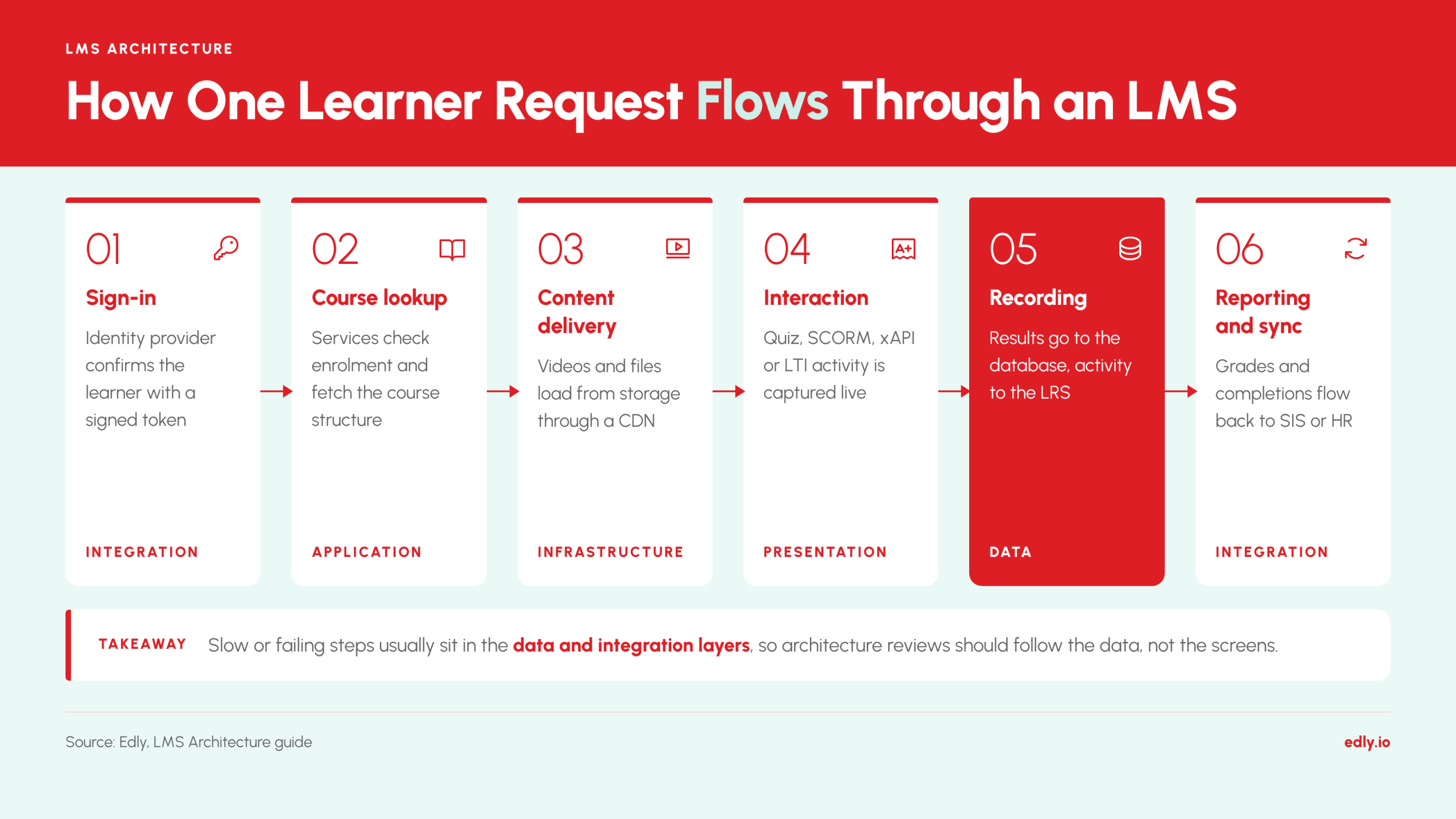
A single learning session touches every layer. Following one learner request shows where each component earns its place.
- Sign-in: the learner opens the LMS and is redirected to the institution’s identity provider; a signed token confirms who they are, and the LMS maps them to a user and role.
- Course lookup: the application layer checks enrolment, fetches the course structure from the database and returns it to the interface.
- Content delivery: videos and files are served from object storage, usually through a CDN so they load quickly from a nearby location.
- Interaction: the learner takes a quiz or opens a SCORM, xAPI or LTI tool; the platform records answers and progress as they happen.
- Recording: results go to the relational database, and detailed activity statements go to the learning record store.
- Reporting and sync: reports, dashboards and exports read from these stores; grades and completions flow back to the student information system or HR system through the integration layer.
The practical lesson is that slow or failing steps are usually in the data and integration layers, not the interface, which is why architecture reviews should follow the data, not the screens.
Standards and integrations every LMS buyer should know
Standards are the integration contract between an LMS and everything around it. Support for them, ideally with certification, is the clearest sign that a platform is open rather than a silo.
| Standard | What it does | Where it fits | Use it when |
|---|---|---|---|
| SSO: SAML 2.0, OpenID Connect | Lets users sign in with institutional credentials | Identity provider to LMS | Always; avoids separate passwords and eases offboarding |
| SCIM | Automates user and group provisioning and deprovisioning | Identity or HR system to LMS | You manage many users and need accounts to follow roster changes |
| LTI 1.3 and LTI Advantage | Securely launches external tools inside the LMS and passes back grades and roster | LMS and learning tools | You embed third-party tools or publisher content |
| OneRoster | Exchanges rosters, courses, enrolments and grades | Student information system to LMS | K-12 and higher-ed environments with a student information system |
| SCORM 1.2 and 2004 | Packages content that reports completion and scores to the LMS | Content to LMS runtime | You have existing e-learning packages |
| xAPI | Records detailed learning activities as statements sent to a learning record store | Any activity source to LRS | You need analytics beyond course completion, including mobile and offline learning |
| cmi5 | An xAPI profile that defines how an LMS launches and tracks content | LMS and modern content | You want xAPI tracking with an LMS-style launch model |
| QTI | Exchanges assessment items and tests | Assessment tools and LMS | You move question banks between systems |
| Caliper Analytics | A 1EdTech standard for describing learning events | Tools to analytics stores | Your ecosystem is built on 1EdTech standards |
Deployment and hosting models
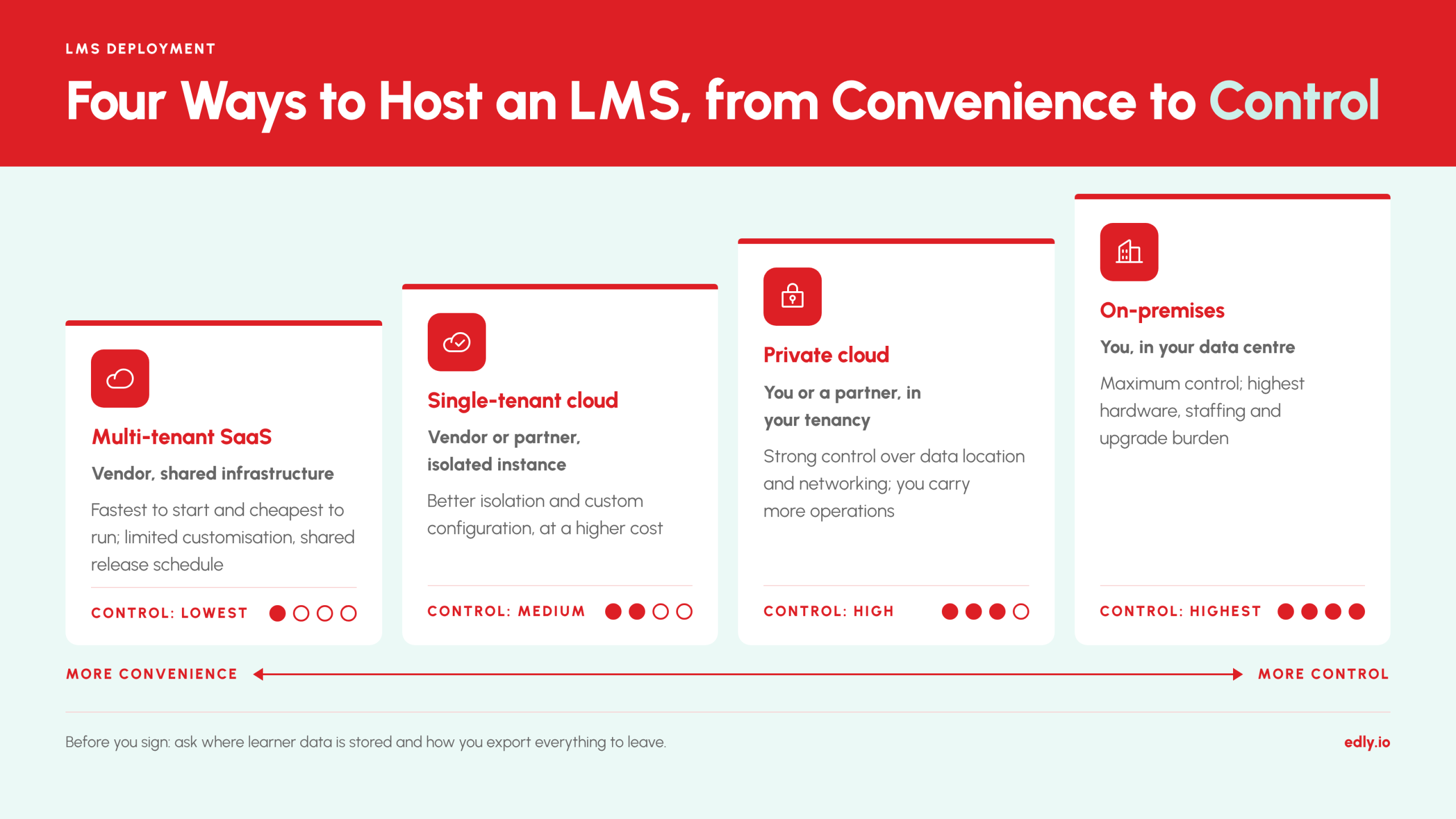
Where and how an LMS runs changes cost, control and risk as much as its feature set does. The four common models trade convenience against control.
| Model | Who runs it | Control | Typical trade-off |
|---|---|---|---|
| Multi-tenant SaaS | Vendor, shared infrastructure | Lowest | Fastest to start and cheapest to run; limited customisation and shared release schedule |
| Single-tenant (dedicated) cloud | Vendor or partner, isolated instance per customer | Medium | Better isolation and custom configuration; higher cost |
| Private cloud or your own cloud account | You or a partner, in your cloud tenancy | High | Strong control over data location and networking; you carry more operations |
| On-premises | You, in your data centre | Highest | Maximum control; highest hardware, staffing and upgrade burden |
Data residency and exit
Two questions are often skipped and later regretted. First, where is learner data stored and processed? Regulation or policy may require specific regions. Second, how do you leave? Ask for the documented export of courses, learner records and completion history in open formats, and whether you can get it without a professional-services engagement. An LMS you cannot exit is a hidden long-term cost.
Scalability, performance, security and accessibility
Scaling an LMS
LMS load is spiky: enrolment opens, assignments fall due and exams start at the same moment. Plan for the peak, not the average. The levers that matter most are:
- Caching and CDN: serve static assets and video from the edge so the application servers handle logic, not file delivery.
- Horizontal scaling: run several stateless application instances behind a load balancer and add more at peak.
- Database strategy: separate read traffic from writes with replicas, index heavy queries and archive old records.
- Queues for background work: push emails, grade calculation, report generation and imports to asynchronous workers so they do not slow the interface.
- Multi-tenancy design: decide early how tenants are isolated, because it shapes scaling, security and backup.
- Load testing: test against realistic peak scenarios, such as a full cohort starting an exam together, before the real event.
Be cautious with vendor numbers such as “supports 50,000 concurrent users”. They depend on the content, the integrations and the test conditions, so ask for the test method and, where possible, results from a comparable customer.
Security and privacy checklist
- Independent assurance such as SOC 2 Type II or ISO 27001, with the report available under NDA
- Encryption of data in transit and at rest, and a clear key management approach
- Role-based access control and least-privilege admin roles
- Audit logs for logins, grade changes and data exports
- SSO with multi-factor authentication enforced through the identity provider
- Compliance with the privacy rules that apply to you, such as FERPA, COPPA or GDPR, and a data processing agreement
- Documented backup, disaster recovery and incident response, with recovery targets
- Vulnerability management, including regular penetration tests
Accessibility
Accessibility is an architectural requirement, not a late fix. Ask for conformance with WCAG 2.1 or 2.2 level AA, a current VPAT or accessibility conformance report, and evidence that authoring tools produce accessible content by default.
Worked example: how Open edX maps to the layers
Open edX is an open-source learning platform, and it is a useful example because its structure is public. The mapping below uses the components named in the Open edX documentation.
| Layer | Open edX component | Notes |
|---|---|---|
| Presentation | The LMS for learners and Studio for course authoring; mobile apps; theming | Appearance can be changed through comprehensive theming and a frontend plugin framework with slots |
| Application and services | Course delivery, discussions, notifications, bulk email, certificates, badges, open response assessments | Courses are described in OLX (Open Learning XML) |
| Extensibility | XBlocks for custom learning components; a hooks extension framework | Lets teams add features without forking the core |
| Data and analytics | xAPI and Caliper event tracking; Aspects for learner analytics | Event data supports analytics beyond completion |
| Integration | LTI (as a tool provider and consumer), SCORM content support, third-party authentication | Sign-in and tool launches use standards rather than custom code |
| Infrastructure | Deployed and operated with Tutor, the official distribution tool | Tutor packages the platform for operators and developers |
What this shows
The open-source route gives you the architecture in full view and the freedom to extend it through XBlocks, hooks and plugins, but you also own the operations: upgrades, scaling, security patching and monitoring. That is the central trade-off between running open source yourself and using a managed service. Edly specialises in the managed route for Open edX, so teams get the open source flexibility without carrying the operational load.
AI in LMS architecture
AI features such as tutoring assistants, content generation, recommendations and predictive analytics are best treated as services that plug into the existing layers, not as a separate product bolted on. Architecturally that means three things:
- They need data access: AI features read from the learning record store and the course and user data, so a clean, well-governed data layer comes first.
- They need the integration layer: models may run in the vendor’s service or a third party’s, reached over APIs, so authentication, rate limits and logging apply as for any other integration.
- They need governance: decide what learner data may be sent to a model, whether it is used for training, and how outputs are reviewed.
Questions worth asking any vendor: Which AI features exist, and which model providers are used? Is learner data used to train models? Can institutions switch features off? How are bias, accuracy and student privacy tested and documented? Treat unsourced claims such as “predicts dropout with 90% accuracy” with caution unless the vendor shows the method.
Build, buy or extend: a decision framework
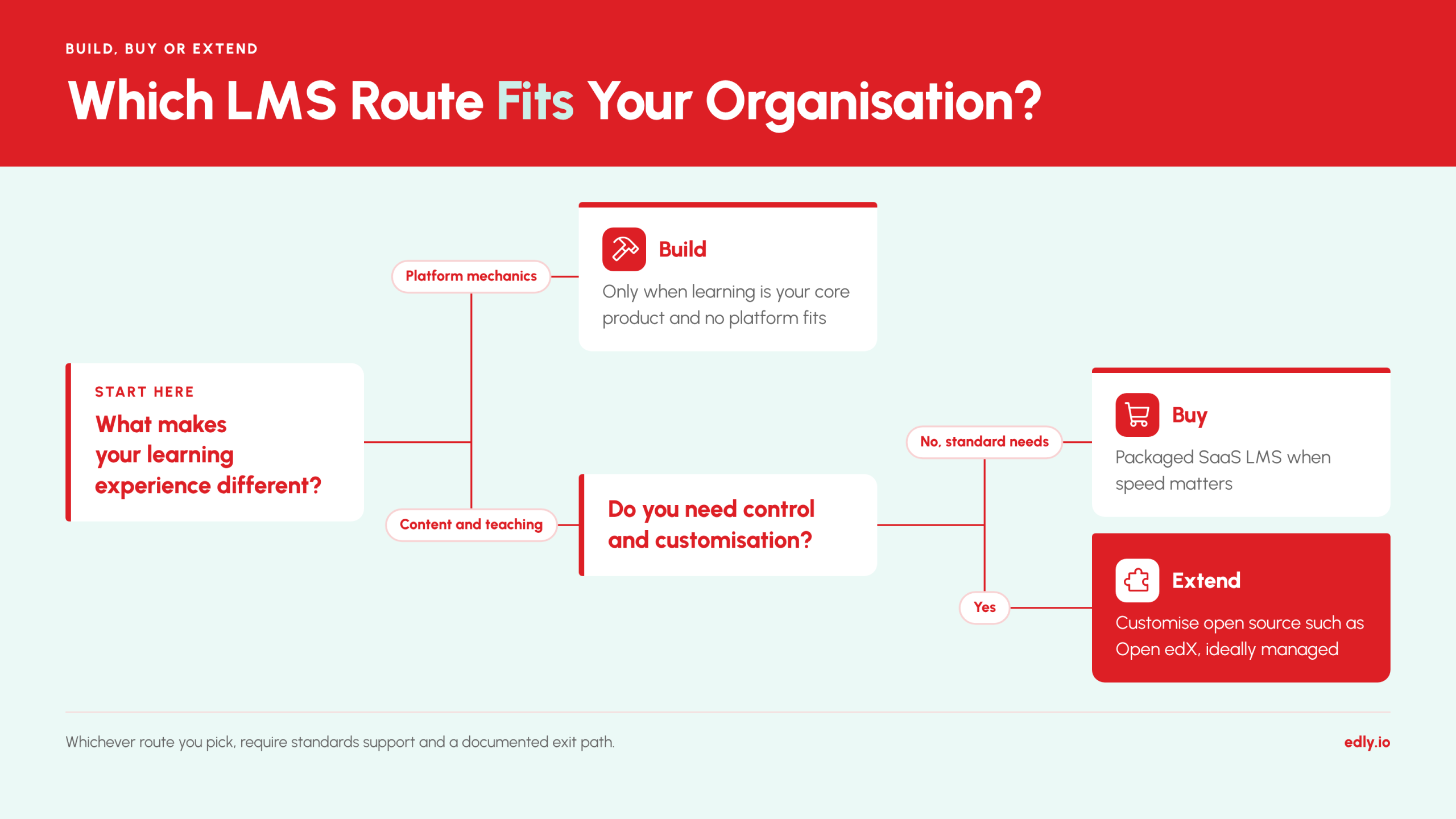
Three routes lead to an LMS, and most organisations are best served by the middle one.
| Route | What it means | Choose it when | Watch out for |
|---|---|---|---|
| Build | Develop a custom LMS from scratch | Learning is your core product and no platform fits | Years of effort, ongoing maintenance, and rebuilding standards support |
| Buy | Subscribe to a packaged SaaS LMS | Needs are standard and speed matters | Limited customisation, vendor lock-in, shared roadmap |
| Extend | Adopt an open-source platform and customise it, self-run or managed | You need control and customisation without building the core | Operational ownership unless you use a managed provider |
A useful test is to ask what makes your learning experience different. If the answer is content and teaching, buy or extend. If it is the platform mechanics themselves, building may be justified. Whichever you pick, require standards support and a documented exit path, because those protect you if the decision proves wrong.
Questions to ask any LMS vendor
Take this checklist into your next vendor meeting. Strong vendors answer with documents and evidence, not adjectives.
- Can you share an architecture diagram showing components, data stores and integrations?
- Which versions of LTI, SCORM, xAPI, OneRoster and SCIM do you support, and are you certified?
- Which SSO protocols and identity providers have you integrated, and does MFA pass through?
- Is the platform multi-tenant or single-tenant, and how is customer data isolated?
- Where is data stored and processed, and can we choose the region?
- What was peak concurrent usage at a comparable customer, and how was it tested?
- Can we see your latest SOC 2 or ISO 27001 report and your accessibility conformance report?
- What are your backup frequency, recovery time and recovery point targets?
- How do we export all courses, learner records and completions, and in what formats?
- Which AI features exist, which providers are used, and is learner data used for training?
- What is the upgrade policy, and how are customisations kept through upgrades?
- What is included in the price, and what costs extra: integrations, storage, support, environments?
Conclusion: choose the architecture, not just the feature list
An LMS that looks right in a demo can still fail on scale, security or integration if its architecture is wrong for your organisation. Judge a platform by its layers, its standards support, its deployment model and its exit path, and ask for evidence at each step.
If you are weighing an open-source route, Edly helps institutions and organisations run Open edX as a managed service. Talk to Edly about mapping your requirements to an architecture that fits.
Frequently asked questions
What is LMS architecture?
LMS architecture is the structural design of a learning management system. It defines the layers, services, data stores and integrations that deliver courses, track learner progress and connect the platform to identity, student and HR systems. It determines scalability, security, interoperability and long-term cost.
What are the main components of an LMS?
An LMS typically has five layers: a presentation layer (learner app, authoring tools, admin console), application services (courses, enrolment, assessment, reporting), a data layer (databases, learning record store, media storage), an integration layer (APIs, LTI, SCORM, webhooks) and infrastructure (compute, CDN, monitoring).
Is a monolith or microservices better for an LMS?
Neither is better in every case. A monolith or modular monolith suits small teams and moderate scale because it is simpler to run. Microservices suit large platforms with many teams and uneven load, because parts can scale and release independently, at the price of more operational complexity.
What is the difference between SCORM, xAPI and LTI?
SCORM packages course content that reports completion and scores to an LMS. xAPI records detailed learning activity as statements in a learning record store, inside or outside the LMS. LTI launches external tools within the LMS and passes grades and roster information back.
How does an LMS integrate with other systems?
An LMS integrates through its integration layer using standards: SSO protocols such as SAML or OpenID Connect for sign-in, SCIM for provisioning, OneRoster for student information systems, LTI for learning tools, and APIs or webhooks for custom data flows with HR systems and data warehouses.
How do you scale an LMS for thousands of learners?
Plan for peak load such as enrolment or exams. Use a CDN and caching, run multiple stateless application instances behind a load balancer, separate database reads from writes, move heavy tasks to background queues, and load-test realistic peak scenarios before the event.
What should I check about LMS security?
Ask for independent assurance such as SOC 2 Type II or ISO 27001, encryption in transit and at rest, role-based access, audit logs, SSO with multi-factor authentication, a data processing agreement, tested backups and disaster recovery, and compliance with privacy rules such as FERPA or GDPR.
Should we build, buy or extend an LMS?
Build only when the platform itself is your product. Buy a SaaS LMS when your needs are standard and speed matters. Extend an open-source platform such as Open edX when you need control and customisation without building the core, ideally with a managed provider handling operations.
